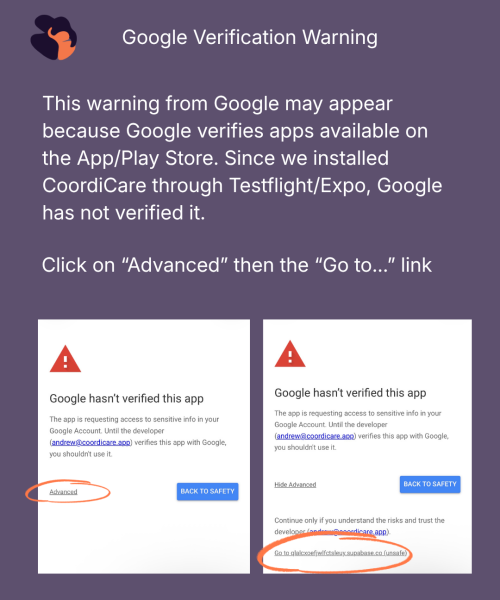
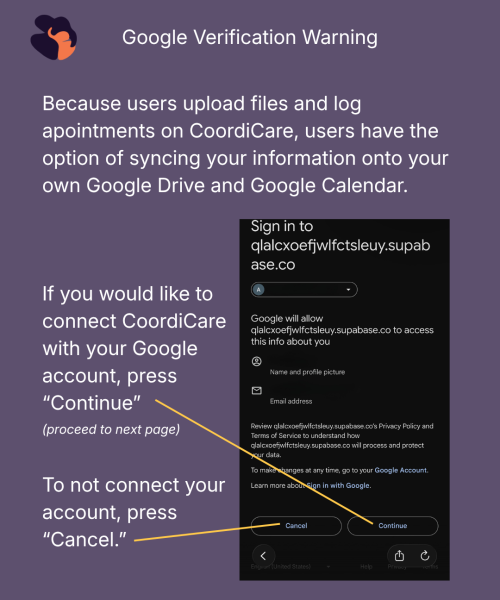
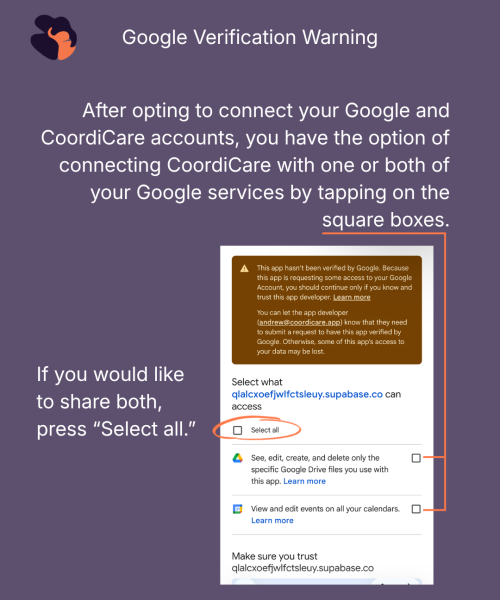
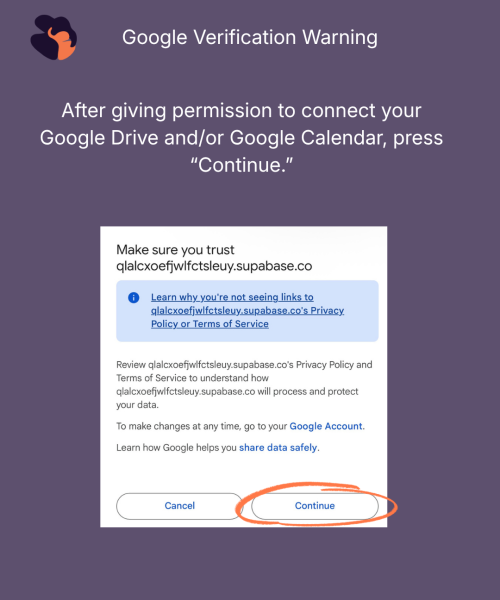
Welcome to the CoordiCare Beta

Hi,

I’m Arpita, the founder of CoordiCare. I built this app because I know firsthand how overwhelming caregiving can be — juggling appointments, medications, and tasks while trying to coordinate with family members who all want to help but don’t always know how.

CoordiCare is my answer to that chaos. It’s a care coordination app that helps families manage everything in one shared space — so no one has to carry the weight of caregiving alone.

You’re one of a small group of people I’ve personally invited to help shape what CoordiCare becomes. Your feedback over the next two months will directly influence what we build next, and I’m genuinely grateful you’re here. You don’t need to be technical — just use the app as you would in real life and tell us what you think. We want to know:

  • What feels confusing or hard to use
  • What’s missing that would make your caregiving easier
  • What you love and want us to keep

Get started below.

🍎 iOS

    1. Download TestFlight from the App Store: Download TestFlight 
      • This iOS app will automatically update with any changes we make to the app.
    2. Once TestFlight is installed, click the unique link to install CoordiCare: Install CoordiCare for iOS
      • This link will open the Testflight app specific to CoordiCare. Press “Install.”
    3. Tap the button to install via TestFlight: Install CoordiCare for iOS
      • Once CoordiCare is installed, it will create a new app on your home screen. Open CoordiCare through Testflight or the new app.
    4. Create account and start testing!

Having trouble? Email support@coordicare.app

📱 Android

  1. Click the unique link to install CoordiCare for Android: Download CoordiCare for Android
    • Install the latest version here (as of 04/26/2026)
  2. Enable unknown app installation in settings. In your phone Settings, navigate to Install unknown apps under Special Access to enable installation. Once downloaded, tap the file to install it
  3. Scroll down to “My Files” and toggle to enable.
  4. Go to the “My Files” app and tap “Install.” 
  5. Create account and start testing!

Having trouble? Email support@coordicare.app

How to Share Feedback

  • In-app feedback — tap the 💬 icon in the top right corner of the app anytime. You can add screenshots and voice notes.
  • Weekly survey — every week I’ll send a short 5-minute survey. Your responses help us prioritize what to fix and build next.
  • Email us at support@coordicare.app — seriously, message us anytime. We read every message personally.
What is CoordiCare?

CoordiCare helps families coordinate care for aging parents, children with medical needs, or anyone who needs extra support. Features include:

  • Shared medication tracking and reminders
  • Appointment scheduling and notes
  • Health journal and emergency visit logs
  • Task assignment across your care circle
  • Document storage and sharing
  • Care partner invitations so family and friends can help
  • Testing period: 2 months
  • Time commitment: Use the app weekly + 5-minute survey each week
  • Platform: iOS (TestFlight) and Android

Download: 👉 coordicare.app/sign-up

Any health information you enter is private to your care circle. We take data privacy seriously and will never sell or share your information. Full privacy policy at coordicare.app/privacy.

Scroll to Top